
WAC Bras - Navegação Aérea: Your Go-To Aviation Navigation App
Screenshots

Introduction
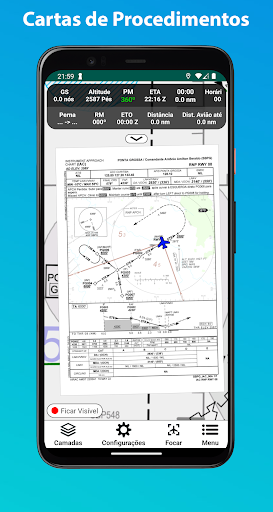
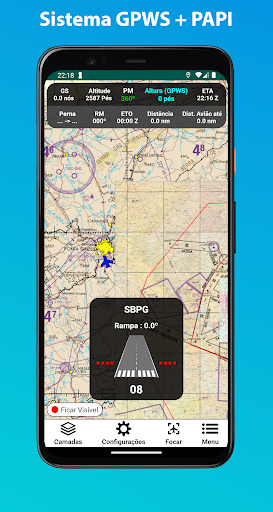
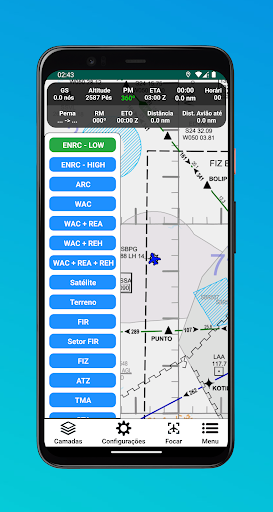
WAC Bras - Navegação Aérea is a specialized aviation navigation application developed by PROTOHM TECH LTDA. This app is tailored for aviation enthusiasts and professionals alike, offering a comprehensive suite of tools for accessing Brazilian WAC charts, REA, REH, ARC, ENRC LOW, ENRC HIGH, and updated IFR procedure charts. Additionally, WAC Bras provides real-time weather images via radar and satellite, as well as wind charts and SIGWX charts. The app is compatible with both real flights and popular flight simulators, including Flight Simulator 2020, Flight Simulator 2024, X-Plane 10, X-Plane 11, and X-Plane 12. With features like GPWS (Ground Proximity Warning System) and PAPI (Precision Approach Path Indicator), users can enhance their flying experience, whether they're in the cockpit or using a simulator.
Graphics & Gameplay
The visual interface of WAC Bras is clean, intuitive, and designed with the user experience in mind. The screenshots depict a well-organized layout, featuring various navigation options alongside maps and charts. The app utilizes vibrant colors to distinguish different chart types and navigation elements, making it easy for users to find the information they need at a glance. The map view is interactive, allowing users to zoom in and out seamlessly while accessing detailed data about their location and route. The integration of real-time weather imagery is visually appealing and critical for pilots to make informed navigation decisions. Overall, the graphics are functional yet engaging, catering specifically to the needs of aviation users.
Key Features
- Comprehensive Navigation Charts: Access an extensive library of Brazilian WAC and IFR procedure charts, ensuring that you have the most updated information at your fingertips.
- Real-Time Weather Updates: Stay informed with live radar and satellite imagery, as well as wind charts to assist in your flight planning.
- Flight Simulator Compatibility: Use the app seamlessly with popular flight simulators, elevating your simulation experience with real-world navigation tools.
- Route Planning: Create and save custom flight routes by placing markers on the map, using coordinates, or searching by name for specific locations.
- GPWS and PAPI Systems: Leverage advanced ground proximity alerting and approach path indicators, providing essential auditory feedback during critical flight phases.
- Flight Data Tracking: Monitor vital flight parameters such as groundspeed (GS), altitude, estimated time of arrival (ETA), and more, to keep your navigation precise and informed.
- Subscription Model: Access premium features and charts through a flexible subscription model, including monthly, semi-annual, annual, or lifetime options.
Mod Features
- Premium Unlocked: Enjoy all the features of the app without the need for a subscription. Access every chart and tool available, unleashing the full potential of WAC Bras.
- No Ads: Experience uninterrupted navigation with an ad-free interface, allowing you to focus entirely on your flying experience.
- Unlimited Money: Acquire in-app resources without restrictions, making it easy to purchase any additional features or tools you may need.
- Enhanced Map Features: Get advanced map features, including 3D terrain views and augmented reality overlays, adding another layer of realism to your navigation.
How to Install APK on Android
Installing the WAC Bras APK on your Android device is a straightforward process. Follow these steps to get started:
- Enable Unknown Sources: Go to your device's Settings > Security and enable Unknown Sources to allow installations from sources other than the Google Play Store.
- Download the APK: Visit the official download link provided below to download the WAC Bras APK file directly to your device.
- Locate the File: Use a file manager app to find the downloaded APK file in your device's Downloads folder.
- Install the App: Tap on the APK file to initiate the installation process. Follow the on-screen prompts to complete the installation.
- Open the App: Once installed, you can find WAC Bras in your app drawer. Launch the app and start exploring the world of aviation navigation!
For the best experience and to access all features, consider subscribing to their premium services within the app.
Call To Action
Ready to elevate your aviation navigation experience? Download WAC Bras - Navegação Aérea today by clicking here and embark on your flying journey with the most reliable navigation tools at your disposal!